The question that started it
Someone wrote in and asked how to print a master list of the playlist titles. The honest answer, at the time, was that you could not. We made cards and only cards.
Which is a strange hole once you notice it, because the cards are the half of the game the players get. The other half is the person standing at the front with the speaker, and until now that person had nothing to work from — just a Spotify screen and their memory of which songs had already come up.
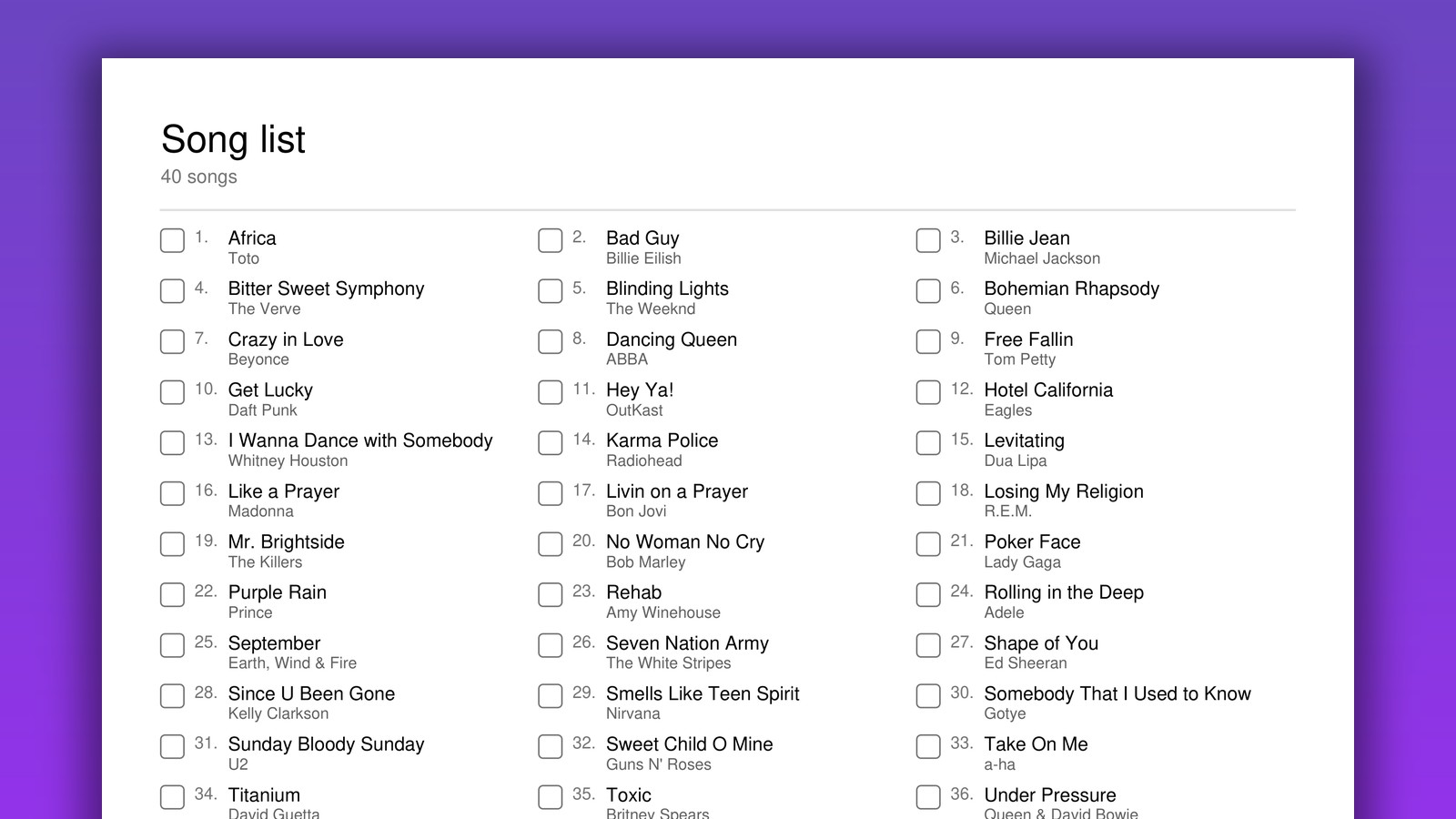
So there is now a second button next to Export PDF, labelled Song list. It prints the sheet the host calls from.
What is on the sheet
One page, in most cases. Every song that can actually come up, sorted alphabetically and numbered, with the artist underneath in smaller grey type and an empty box in front of each one to tick as you play it.
- Two or three columns, chosen automatically, so a 40‑song playlist lands on a single sheet instead of making you flip paper mid‑game.
- The song count in the header, so you know at a glance how long the round is going to run.
- The same font as your cards. If you set your deck in Poppins, the sheet comes out in Poppins. It is part of the same set of paper, and it looks like it.
- Longer playlists paginate properly. Import 200 songs and you get as many pages as it takes, with the header only on the first.
Tick each song as you play it. When somebody shouts bingo, you check their marked squares against your ticks — that is the whole verification procedure, and it takes about ten seconds.
Why it downloads as its own file
It would have been easier to staple the list onto the end of the card PDF as one more page. We deliberately did not.
This sheet is the answer key. Every song, in order, on one page. Slipped into the stack you hand round the room, it ruins the game for whoever gets that copy — and at a party, that stack gets handed round fast. Keeping it a separate download means the only way it reaches a player is if you put it there.
Why it lists the cards, not your library
A subtle one, and worth explaining because it is the kind of thing you would otherwise assume was a bug.
The sheet is built from the songs that landed on the cards, not from everything in your song library. Those are usually different: a library of 60 songs feeding a small print run will leave some tracks on no card at all. Calling one of those is a dead turn — you play a song, and nobody in the room can mark anything, because it is not on anyone's card.
So what you get is exactly what is in play. Nothing on the sheet is unmarkable.
Mostly for the paper game
If you run the live multiplayer version, you already had this: the host screen keeps its own list, lets you mark songs as played, and checks claims against it for you.
But most people who use this site print. They generate a deck, hand it out at a bar or a classroom or a birthday, and play off paper with a phone plugged into a speaker. That way of playing never had a caller's sheet, and it is the way of playing that needs one most — there is no screen keeping track for you.
How to get it
It is already live, and it is free like the rest of it. Build a playlist — paste a Spotify link or type titles by hand — generate your cards, and you will find Song list sitting next to Export PDF. No sign‑up, no watermark, and the sheet carries nothing but a small bingocreator.com line at the foot of the page.
One suggestion, from watching people run these: print two copies. Whoever is on the music rarely stays on the music all night.
Try it on your next game
Generate the cards, download the song list, and the whole night fits on paper.
Create Your Cards